Exploring Key Concepts, ICT Curriculum for Student Success

Information and Communication Technology (ICT) plays a crucial role in today’s education. Universal Homeschool students, ICT is more than just learning how to use computers; it builds a foundation for digital literacy and problem-solving skills that are essential for future academic and career success. This post explores some of the key concepts covered in the Universal Homeschool ICT curriculum, highlighting how these lessons prepare students for a technology-driven world.
Understanding Computer Hardware and Software
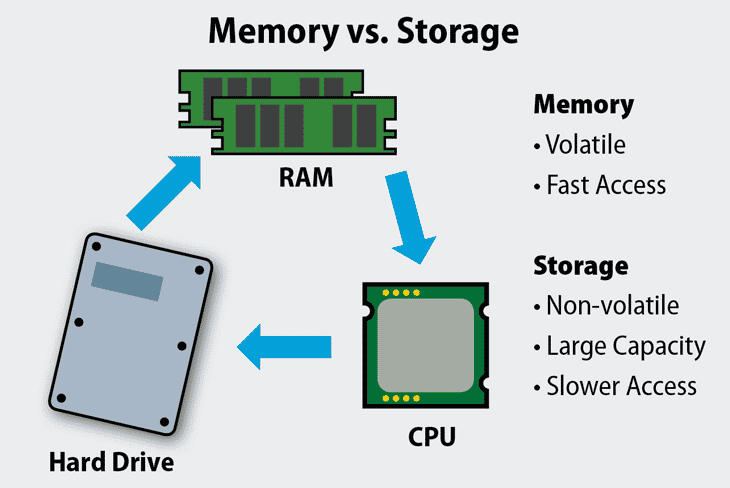
One of the first topics students encounter is the difference between hardware and software. Hardware refers to the physical parts of a computer system, such as the CPU, memory, storage devices, and input/output peripherals. Software includes the programs and operating systems that run on the hardware.
Students learn to identify components like:
Central Processing Unit (CPU)
Random Access Memory (RAM)
Hard drives and Solid State Drives (SSD)
Input devices like keyboards and mice
Output devices such as monitors and printers
Understanding these parts helps students grasp how computers function and how software interacts with hardware to perform tasks.
Introduction to Programming and Coding
Programming is a key part of the Grade 9 ICT curriculum. Students are introduced to basic coding concepts using beginner-friendly languages such as Python or Scratch. They learn about:
Variables and data types
Control structures like loops and conditionals
Functions and procedures
Debugging and testing code
For example, students might write a simple program that calculates the area of a rectangle or creates an interactive story. These exercises develop logical thinking and problem-solving skills.
Exploring Networks and the Internet
Another important area is understanding how computers connect and communicate. Students study:
Types of networks (LAN, WAN)
The role of the internet and how it works
IP addresses and domain names
Basic cybersecurity principles
This knowledge helps students appreciate the infrastructure behind online services and the importance of safe internet practices.
Using Productivity Software Effectively
Universal Homeschool ICT classes also focus on practical skills with common software tools. Students learn to use:
Word processors for writing and formatting documents
Spreadsheets for organizing data and performing calculations
Presentation software to create engaging slideshows
For instance, students might create a report using a word processor, including images and tables, or build a budget spreadsheet with formulas. These skills are valuable across many subjects and real-life situations.
Digital Citizenship and Ethics
A critical part of the curriculum is teaching responsible use of technology. Students discuss topics such as:
Online privacy and data protection
Cyberbullying and respectful communication
Intellectual property and plagiarism
Evaluating the credibility of online information
By understanding these issues, students learn to navigate the digital world safely and ethically.
Introduction to Multimedia and Graphic Design
Students also explore creating digital content. This includes:
Basic image editing and graphic design principles
Creating simple animations or videos
Understanding file formats and compression
These activities encourage creativity and help students communicate ideas visually.
Practical Projects and Collaboration
Many Universal Homeschool ICT courses include group projects that combine several skills. For example, students might work together to:
Design a website or blog
Develop a simple game or app
Create a multimedia presentation on a chosen topic
Collaborative projects teach teamwork, planning, and communication, which are essential skills beyond the classroom.
Preparing for Future Learning and Careers
The Universal Homeschool ICT curriculum lays the groundwork for more advanced studies in technology. It introduces students to concepts they will encounter in higher grades, such as:
Advanced programming languages (Python, C, Java)
Database management
Robotics and automation
Data analysis and visualization
Moreover, the skills gained are relevant to many career paths, from engineering and science to business and the arts.
The ICT curriculum in Universal Homeschool offers a balanced mix of theory and hands-on practice. By learning about hardware, software, programming, networks, and digital ethics, students build a strong foundation for success in school and beyond. These lessons equip young learners with the tools to understand and use technology confidently and responsibly.


Comments